UI / UX Design
Delhi Metro
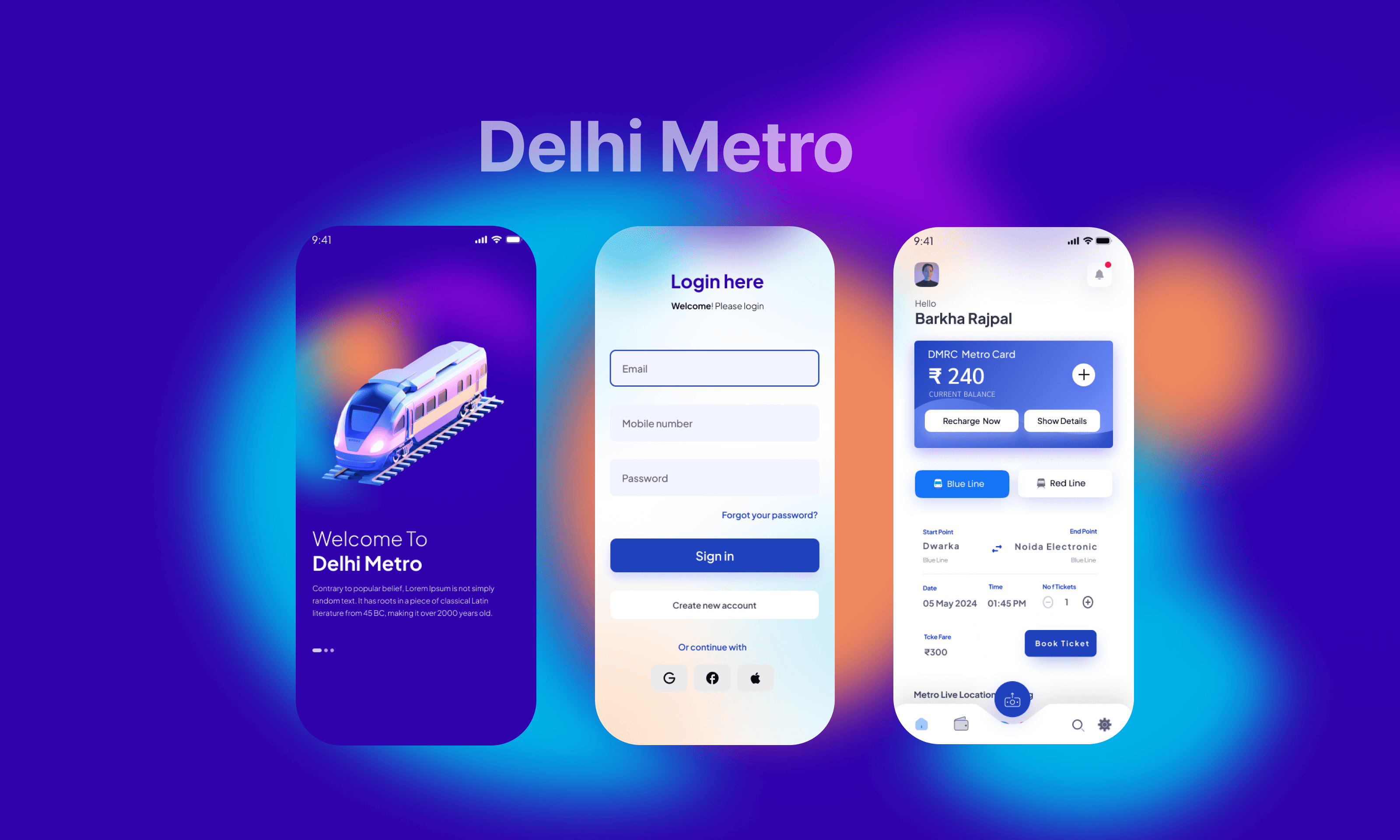
A smart, user-friendly metro app that enables quick, reliable ticket booking while solving payment and connectivity issues.
Year :
2024
Industry :
customer oriented
Client :
Delhi Metro
Project Duration :
3 weeks
Problem :
Payment & QR Ticketing Failures
Digital ticketing systems sometimes fail to process payments, timeout, or crash during peak hours.
QR codes or digital tickets often don’t load when needed at station gates (especially in underground/low-connectivity areas) causing delays or invalid entries.
Example: At one metro system, “payment failed due to poor connectivity; none of us was carrying cash” scenario.
Complex or Poorly Optimised Booking Flows
Apps sometimes bury the primary “Book Ticket” function behind multiple steps or secondary menus, increasing time-to-ticket.
Users may face difficulty booking for more than one passenger, or doing round-trips, or selecting proper station pairing.
Confusing station filters/search: Users may struggle to find start/end stations quickly.
Connectivity & Infrastructure Constraints
Inside stations (underground, tunnels), mobile data or WiFi may be weak, so digital ticketing or scanning may fail.
Physical ticketing alternatives may lag or be removed, leaving commuters stranded if digital fails.
User Experience / Accessibility Issues
Poor contrast, small buttons, unclear icons, missing labels — making it hard for older or less-tech-savvy users.
Mandatory account creation or long sign-up flows hamper users who just want a quick ticket.
Lack of Real-Time Information & Transparency
Users may not see live train timings, crowd data, or delays while booking. They might book and still face unexpected waitings.
Fare calculations or station-to-station info may be unclear in the booking flow.
Mismatch between App and Station Systems
Digital tickets may not sync quickly with turnstile/gate systems, leading to rejected scans and delays.
Station staff may be unfamiliar with digital-only flows, so user support is limited.
High Cognitive Load & Decision Complexity
Many options (selecting line colour, start & end station, ticket type, passenger count) in one screen lead to confusion.
Secondary features (recharge smartcard, pass, etc) may clutter the booking path instead of focusing on the core task.

Solution :
1. Payment Failures
Add multiple payment options (UPI, cards, wallets, net banking).
Include retry payment and auto-refund confirmation messages.
Allow users to save tickets offline (QR available without internet).
Provide “Transaction History” and payment support chat.
🔵 2. Complicated Booking Process
Create a simple 3-step flow — Select Route → Confirm Fare → Pay.
Add station auto-suggestions in search.
Show recent or favorite routes for one-tap booking.
Use visual icons or maps for metro lines (Blue Line, Red Line).
🟠 3. Connectivity Problems (Underground)
Enable offline ticket access (QR stored on device).
Preload essential data (stations, fares, timings).
Show “No Internet Mode” with limited features (view last ticket).
Allow SMS-based ticket confirmation as backup.
🔵 4. Accessibility & Readability
Use high color contrast (text easily visible on gradient background).
Add font resizing and Hindi/English toggle.
Provide voice search for station names.
Keep large touch areas (minimum 44px buttons).
🟣 5. Lack of Real-Time Information
Display live metro arrival times and crowd levels.
Add next-train countdown timer.
Show platform and interchange alerts while booking.
Integrate notifications for delays or closures.
🟠 6. App–Gate Sync Errors
Ensure real-time sync between app and metro gate systems.
Add “Scan Retry” button if QR doesn’t work.
Allow station staff to verify ticket using mobile number.
Show ticket validity timer clearly (e.g., “Valid for 30 mins”).
🔵 7. Overloaded Screens
Use progressive disclosure (show only important info first).
Group secondary options under “More” or “Settings.”
Highlight one main action — “Book Ticket.”
Maintain visual balance using whitespace and consistent spacing.
🟣 8. Poor Feedback & Error States
Add clear success/error messages (e.g., “Payment failed, try again”).
Include loading indicators and confirmation animations.
Provide instant ticket receipts with details (date, fare, time).
Use color-coded alerts — green (success), red (error).
🔵 9. Account Creation Friction
Allow Guest Booking (without mandatory sign-up).
Offer Quick Login via OTP instead of full registration.
Save preferred stations for repeat users.
Simplify profile setup — optional fields after first use.
🟠 10. Peak Hour Convenience
Introduce “Quick Book” button (auto-fills last trip).
Add shortcuts for favorite routes on home screen.
Provide Smart Suggestions based on user’s travel time (e.g., office hours).
Offer multi-ticket booking for family/friends.


Challenge :
🟣 1. Connectivity & Network Issues
Poor mobile network or no internet in underground metro stations.
QR tickets fail to load or scan at entry gates.
Payment gateway timeouts due to weak signal.
🔵 2. Complicated Booking Flow
Users have to go through too many steps to book a single ticket.
Confusion between smart card recharge and ticket booking options.
No clear call-to-action; users get lost between pages.
🟠 3. Payment & Transaction Failures
UPI or wallet payments sometimes fail without clear reason.
Users don’t get instant confirmation or refund updates.
Repeated payment attempts increase frustration and mistrust.
🟣 4. Poor User Experience / Interface Design
Overloaded screens with too much text or information.
Low contrast makes text unreadable on gradient backgrounds.
Small tap targets make it hard for users to select stations or options.
Inconsistent design language across screens.
🔵 5. Lack of Real-Time Information
Users cannot see train arrival times before booking.
No updates on delays, crowd levels, or closed stations.
Absence of “live map” or “train status” feature.
🟠 6. Limited Accessibility
No language switch (Hindi/English) for non-English speakers.
No text-to-speech or voice input options.
Difficult for elderly or first-time smartphone users to understand.
🟣 7. App–Gate Synchronization Issues
Delay between digital ticket generation and validation at metro gate.
Scanning problems due to lighting or poor QR detection.
Station staff not always aware of app-based ticketing process.
🔵 8. Time Pressure During Peak Hours
Long queues at vending machines push users to mobile apps.
App lag or crashes during heavy usage hours (morning/evening rush).
Users in hurry expect fast booking — but app takes too long.
🟠 9. Lack of Personalization
No “Quick Book” option for daily travelers.
Users have to re-enter start and end stations every time.
App doesn’t remember frequent routes or preferences.
🟣 10. Trust & Security Concerns
Users hesitate to link payment methods due to data safety fears.
No visible security messages or verification steps.
Summary :
To design a simple, fast, and reliable metro ticket booking experience that helps commuters easily plan journeys, make secure payments, and access digital tickets even with poor connectivity.

More Projects



UI / UX Design
Delhi Metro
A smart, user-friendly metro app that enables quick, reliable ticket booking while solving payment and connectivity issues.
Year :
2024
Industry :
customer oriented
Client :
Delhi Metro
Project Duration :
3 weeks
Problem :
Payment & QR Ticketing Failures
Digital ticketing systems sometimes fail to process payments, timeout, or crash during peak hours.
QR codes or digital tickets often don’t load when needed at station gates (especially in underground/low-connectivity areas) causing delays or invalid entries.
Example: At one metro system, “payment failed due to poor connectivity; none of us was carrying cash” scenario.
Complex or Poorly Optimised Booking Flows
Apps sometimes bury the primary “Book Ticket” function behind multiple steps or secondary menus, increasing time-to-ticket.
Users may face difficulty booking for more than one passenger, or doing round-trips, or selecting proper station pairing.
Confusing station filters/search: Users may struggle to find start/end stations quickly.
Connectivity & Infrastructure Constraints
Inside stations (underground, tunnels), mobile data or WiFi may be weak, so digital ticketing or scanning may fail.
Physical ticketing alternatives may lag or be removed, leaving commuters stranded if digital fails.
User Experience / Accessibility Issues
Poor contrast, small buttons, unclear icons, missing labels — making it hard for older or less-tech-savvy users.
Mandatory account creation or long sign-up flows hamper users who just want a quick ticket.
Lack of Real-Time Information & Transparency
Users may not see live train timings, crowd data, or delays while booking. They might book and still face unexpected waitings.
Fare calculations or station-to-station info may be unclear in the booking flow.
Mismatch between App and Station Systems
Digital tickets may not sync quickly with turnstile/gate systems, leading to rejected scans and delays.
Station staff may be unfamiliar with digital-only flows, so user support is limited.
High Cognitive Load & Decision Complexity
Many options (selecting line colour, start & end station, ticket type, passenger count) in one screen lead to confusion.
Secondary features (recharge smartcard, pass, etc) may clutter the booking path instead of focusing on the core task.
Solution :
1. Payment Failures
Add multiple payment options (UPI, cards, wallets, net banking).
Include retry payment and auto-refund confirmation messages.
Allow users to save tickets offline (QR available without internet).
Provide “Transaction History” and payment support chat.
🔵 2. Complicated Booking Process
Create a simple 3-step flow — Select Route → Confirm Fare → Pay.
Add station auto-suggestions in search.
Show recent or favorite routes for one-tap booking.
Use visual icons or maps for metro lines (Blue Line, Red Line).
🟠 3. Connectivity Problems (Underground)
Enable offline ticket access (QR stored on device).
Preload essential data (stations, fares, timings).
Show “No Internet Mode” with limited features (view last ticket).
Allow SMS-based ticket confirmation as backup.
🔵 4. Accessibility & Readability
Use high color contrast (text easily visible on gradient background).
Add font resizing and Hindi/English toggle.
Provide voice search for station names.
Keep large touch areas (minimum 44px buttons).
🟣 5. Lack of Real-Time Information
Display live metro arrival times and crowd levels.
Add next-train countdown timer.
Show platform and interchange alerts while booking.
Integrate notifications for delays or closures.
🟠 6. App–Gate Sync Errors
Ensure real-time sync between app and metro gate systems.
Add “Scan Retry” button if QR doesn’t work.
Allow station staff to verify ticket using mobile number.
Show ticket validity timer clearly (e.g., “Valid for 30 mins”).
🔵 7. Overloaded Screens
Use progressive disclosure (show only important info first).
Group secondary options under “More” or “Settings.”
Highlight one main action — “Book Ticket.”
Maintain visual balance using whitespace and consistent spacing.
🟣 8. Poor Feedback & Error States
Add clear success/error messages (e.g., “Payment failed, try again”).
Include loading indicators and confirmation animations.
Provide instant ticket receipts with details (date, fare, time).
Use color-coded alerts — green (success), red (error).
🔵 9. Account Creation Friction
Allow Guest Booking (without mandatory sign-up).
Offer Quick Login via OTP instead of full registration.
Save preferred stations for repeat users.
Simplify profile setup — optional fields after first use.
🟠 10. Peak Hour Convenience
Introduce “Quick Book” button (auto-fills last trip).
Add shortcuts for favorite routes on home screen.
Provide Smart Suggestions based on user’s travel time (e.g., office hours).
Offer multi-ticket booking for family/friends.
Challenge :
🟣 1. Connectivity & Network Issues
Poor mobile network or no internet in underground metro stations.
QR tickets fail to load or scan at entry gates.
Payment gateway timeouts due to weak signal.
🔵 2. Complicated Booking Flow
Users have to go through too many steps to book a single ticket.
Confusion between smart card recharge and ticket booking options.
No clear call-to-action; users get lost between pages.
🟠 3. Payment & Transaction Failures
UPI or wallet payments sometimes fail without clear reason.
Users don’t get instant confirmation or refund updates.
Repeated payment attempts increase frustration and mistrust.
🟣 4. Poor User Experience / Interface Design
Overloaded screens with too much text or information.
Low contrast makes text unreadable on gradient backgrounds.
Small tap targets make it hard for users to select stations or options.
Inconsistent design language across screens.
🔵 5. Lack of Real-Time Information
Users cannot see train arrival times before booking.
No updates on delays, crowd levels, or closed stations.
Absence of “live map” or “train status” feature.
🟠 6. Limited Accessibility
No language switch (Hindi/English) for non-English speakers.
No text-to-speech or voice input options.
Difficult for elderly or first-time smartphone users to understand.
🟣 7. App–Gate Synchronization Issues
Delay between digital ticket generation and validation at metro gate.
Scanning problems due to lighting or poor QR detection.
Station staff not always aware of app-based ticketing process.
🔵 8. Time Pressure During Peak Hours
Long queues at vending machines push users to mobile apps.
App lag or crashes during heavy usage hours (morning/evening rush).
Users in hurry expect fast booking — but app takes too long.
🟠 9. Lack of Personalization
No “Quick Book” option for daily travelers.
Users have to re-enter start and end stations every time.
App doesn’t remember frequent routes or preferences.
🟣 10. Trust & Security Concerns
Users hesitate to link payment methods due to data safety fears.
No visible security messages or verification steps.
Summary :
To design a simple, fast, and reliable metro ticket booking experience that helps commuters easily plan journeys, make secure payments, and access digital tickets even with poor connectivity.
More Projects
UI / UX Design
Delhi Metro
A smart, user-friendly metro app that enables quick, reliable ticket booking while solving payment and connectivity issues.
Year :
2024
Industry :
customer oriented
Client :
Delhi Metro
Project Duration :
3 weeks
Problem :
Payment & QR Ticketing Failures
Digital ticketing systems sometimes fail to process payments, timeout, or crash during peak hours.
QR codes or digital tickets often don’t load when needed at station gates (especially in underground/low-connectivity areas) causing delays or invalid entries.
Example: At one metro system, “payment failed due to poor connectivity; none of us was carrying cash” scenario.
Complex or Poorly Optimised Booking Flows
Apps sometimes bury the primary “Book Ticket” function behind multiple steps or secondary menus, increasing time-to-ticket.
Users may face difficulty booking for more than one passenger, or doing round-trips, or selecting proper station pairing.
Confusing station filters/search: Users may struggle to find start/end stations quickly.
Connectivity & Infrastructure Constraints
Inside stations (underground, tunnels), mobile data or WiFi may be weak, so digital ticketing or scanning may fail.
Physical ticketing alternatives may lag or be removed, leaving commuters stranded if digital fails.
User Experience / Accessibility Issues
Poor contrast, small buttons, unclear icons, missing labels — making it hard for older or less-tech-savvy users.
Mandatory account creation or long sign-up flows hamper users who just want a quick ticket.
Lack of Real-Time Information & Transparency
Users may not see live train timings, crowd data, or delays while booking. They might book and still face unexpected waitings.
Fare calculations or station-to-station info may be unclear in the booking flow.
Mismatch between App and Station Systems
Digital tickets may not sync quickly with turnstile/gate systems, leading to rejected scans and delays.
Station staff may be unfamiliar with digital-only flows, so user support is limited.
High Cognitive Load & Decision Complexity
Many options (selecting line colour, start & end station, ticket type, passenger count) in one screen lead to confusion.
Secondary features (recharge smartcard, pass, etc) may clutter the booking path instead of focusing on the core task.
Solution :
1. Payment Failures
Add multiple payment options (UPI, cards, wallets, net banking).
Include retry payment and auto-refund confirmation messages.
Allow users to save tickets offline (QR available without internet).
Provide “Transaction History” and payment support chat.
🔵 2. Complicated Booking Process
Create a simple 3-step flow — Select Route → Confirm Fare → Pay.
Add station auto-suggestions in search.
Show recent or favorite routes for one-tap booking.
Use visual icons or maps for metro lines (Blue Line, Red Line).
🟠 3. Connectivity Problems (Underground)
Enable offline ticket access (QR stored on device).
Preload essential data (stations, fares, timings).
Show “No Internet Mode” with limited features (view last ticket).
Allow SMS-based ticket confirmation as backup.
🔵 4. Accessibility & Readability
Use high color contrast (text easily visible on gradient background).
Add font resizing and Hindi/English toggle.
Provide voice search for station names.
Keep large touch areas (minimum 44px buttons).
🟣 5. Lack of Real-Time Information
Display live metro arrival times and crowd levels.
Add next-train countdown timer.
Show platform and interchange alerts while booking.
Integrate notifications for delays or closures.
🟠 6. App–Gate Sync Errors
Ensure real-time sync between app and metro gate systems.
Add “Scan Retry” button if QR doesn’t work.
Allow station staff to verify ticket using mobile number.
Show ticket validity timer clearly (e.g., “Valid for 30 mins”).
🔵 7. Overloaded Screens
Use progressive disclosure (show only important info first).
Group secondary options under “More” or “Settings.”
Highlight one main action — “Book Ticket.”
Maintain visual balance using whitespace and consistent spacing.
🟣 8. Poor Feedback & Error States
Add clear success/error messages (e.g., “Payment failed, try again”).
Include loading indicators and confirmation animations.
Provide instant ticket receipts with details (date, fare, time).
Use color-coded alerts — green (success), red (error).
🔵 9. Account Creation Friction
Allow Guest Booking (without mandatory sign-up).
Offer Quick Login via OTP instead of full registration.
Save preferred stations for repeat users.
Simplify profile setup — optional fields after first use.
🟠 10. Peak Hour Convenience
Introduce “Quick Book” button (auto-fills last trip).
Add shortcuts for favorite routes on home screen.
Provide Smart Suggestions based on user’s travel time (e.g., office hours).
Offer multi-ticket booking for family/friends.
Challenge :
🟣 1. Connectivity & Network Issues
Poor mobile network or no internet in underground metro stations.
QR tickets fail to load or scan at entry gates.
Payment gateway timeouts due to weak signal.
🔵 2. Complicated Booking Flow
Users have to go through too many steps to book a single ticket.
Confusion between smart card recharge and ticket booking options.
No clear call-to-action; users get lost between pages.
🟠 3. Payment & Transaction Failures
UPI or wallet payments sometimes fail without clear reason.
Users don’t get instant confirmation or refund updates.
Repeated payment attempts increase frustration and mistrust.
🟣 4. Poor User Experience / Interface Design
Overloaded screens with too much text or information.
Low contrast makes text unreadable on gradient backgrounds.
Small tap targets make it hard for users to select stations or options.
Inconsistent design language across screens.
🔵 5. Lack of Real-Time Information
Users cannot see train arrival times before booking.
No updates on delays, crowd levels, or closed stations.
Absence of “live map” or “train status” feature.
🟠 6. Limited Accessibility
No language switch (Hindi/English) for non-English speakers.
No text-to-speech or voice input options.
Difficult for elderly or first-time smartphone users to understand.
🟣 7. App–Gate Synchronization Issues
Delay between digital ticket generation and validation at metro gate.
Scanning problems due to lighting or poor QR detection.
Station staff not always aware of app-based ticketing process.
🔵 8. Time Pressure During Peak Hours
Long queues at vending machines push users to mobile apps.
App lag or crashes during heavy usage hours (morning/evening rush).
Users in hurry expect fast booking — but app takes too long.
🟠 9. Lack of Personalization
No “Quick Book” option for daily travelers.
Users have to re-enter start and end stations every time.
App doesn’t remember frequent routes or preferences.
🟣 10. Trust & Security Concerns
Users hesitate to link payment methods due to data safety fears.
No visible security messages or verification steps.
Summary :
To design a simple, fast, and reliable metro ticket booking experience that helps commuters easily plan journeys, make secure payments, and access digital tickets even with poor connectivity.